
Discord – Talk, Play, Hang Out
Discord Inc.
May 13, 2015
Aug 11, 2026
341.13 - Stable
7.0
500,000,000+

Description
Discord – Talk, Play, Hang Out Review 2026: Features, Servers, Voice Chat, Privacy, Safety & Alternatives

Communication apps have changed significantly over the past few years. Instead of using a separate application for text messages, voice calls, video calls, communities, and gaming conversations, many users now prefer platforms that bring everything together.
Discord – Talk, Play, Hang Out is one of the best-known examples of this approach.
Originally associated primarily with gaming communities, Discord has evolved into a broader communication and community platform where people can create or join servers, exchange messages, participate in voice channels, make video calls, stream their screens, share media, and spend time together online.
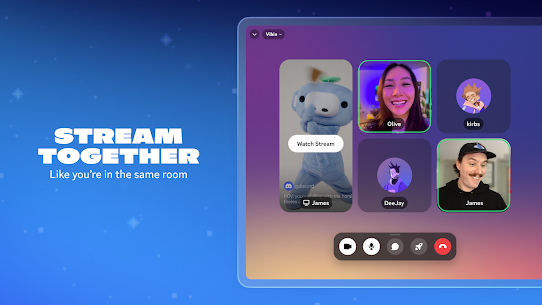
The current Android listing describes Discord as a place to talk, play games, watch content, share media, and build communities. It also highlights custom emojis, stickers, soundboard effects, voice and video chat, low-latency streaming, activities, and cross-device support. (Google Play)
At the time of writing, the Google Play listing shows 100M+ downloads, approximately 6.59 million reviews, and a 4.3-star rating. The Android app was updated on August 12, 2026. (Google Play)
In this comprehensive review, we’ll examine Discord’s main features, mobile experience, servers, voice and video communication, streaming, privacy, safety controls, strengths and weaknesses, and how it compares with alternatives such as Telegram, WhatsApp, Slack, and Guilded.
Discord at a Glance
| Category | Details |
|---|---|
| App Name | Discord – Talk, Play, Hang Out |
| Developer | Discord Inc. |
| Platform | Android, iOS, Windows, macOS, Linux, Web |
| Category | Communication |
| Downloads | 100M+ |
| Google Play Rating | Approximately 4.3/5 |
| Google Play Reviews | 6.59M+ |
| Voice Chat | Yes |
| Video Chat | Yes |
| Screen Sharing | Yes |
| Communities / Servers | Yes |
| Text Channels | Yes |
| Voice Channels | Yes |
| Custom Emojis | Yes |
| Stickers | Yes |
| Soundboard | Yes |
| Gaming Features | Yes |
| Streaming | Yes |
| Cross-Platform | Yes |
| In-App Purchases | Yes |
| Best For | Communities, gaming, group communication and online hangouts |
Download counts, ratings, features, and availability can change as Discord releases new updates. (Google Play)
What Is Discord?
Discord is a communication and community platform that combines text, voice, video, streaming, and social features in one service.
Instead of organizing everything around individual phone numbers, Discord primarily revolves around servers and channels.
A server can be created for:
- Friends
- Gaming groups
- Schools
- Online communities
- Content creators
- Developers
- Artists
- Businesses
- Clubs
- Fan communities
Inside a server, administrators can create different text and voice channels for specific subjects.
For example, a gaming server could have:
#general#announcements#gaming#clips#support
and separate voice rooms for different games or activities.
This structure is one of the biggest reasons Discord feels different from conventional messaging applications.
Who Developed Discord?
Discord is developed and operated by Discord Inc.
The Android application is distributed through Google Play under the name Discord – Talk, Play, Hang Out.
Discord has grown from a gaming-oriented communication platform into a much broader community service.
Today, gaming remains an important part of its identity, but users also use Discord for education, technology communities, creative projects, entertainment, social groups, and other online communities.
My Experience With Discord
The first thing I noticed about Discord is that it feels more like a collection of online spaces than a traditional messaging application.
WhatsApp, for example, generally starts with contacts and conversations.
Discord starts with communities.
Once you join a server, you can move between different conversations without leaving the same community.
Text channels are useful when you want to send messages asynchronously, while voice channels are particularly convenient when several people want to communicate without repeatedly starting and ending calls.
The biggest advantage is that you can simply enter a voice channel when you’re available and leave when you’re finished.
Discord’s current Google Play description specifically highlights this “hop in and out” approach to voice communication. (Google Play)
For gaming, this workflow makes a lot of sense.
You can have Discord open while playing, communicate with teammates, share your screen, and continue the conversation after the game.
Discord Testing Results
A communication application should be evaluated across more than basic messaging.
The following testing categories focus on the areas that matter most to everyday Discord users.
| Test Area | What Was Evaluated | Result / Verdict |
|---|---|---|
| Text Messaging | Sending and receiving messages | Excellent – Fast and well organized across channels and direct messages. |
| Server Navigation | Moving between channels and communities | Very Good – Powerful structure, although beginners may need time to understand it. |
| Voice Chat | Joining and maintaining voice conversations | Excellent – One of Discord’s strongest features. |
| Video Chat | Group video communication | Very Good – Useful for small group conversations and communities. |
| Screen Sharing | Sharing gameplay or applications | Excellent – Particularly useful for gaming and collaborative sessions. |
| Streaming | Low-latency content sharing | Very Good – Designed around real-time social interaction. |
| Notifications | Message and activity alerts | Very Good – Highly configurable, although large servers can generate many notifications. |
| Media Sharing | Images, videos, links and files | Very Good – Convenient for community conversations. |
| Cross-Device Use | Switching between phone and computer | Excellent – One of Discord’s biggest advantages. |
| Community Management | Roles, channels and permissions | Excellent – Extremely powerful for server administrators. |
| Gaming Integration | Games and activity visibility | Excellent – Especially useful for gaming communities. |
| Privacy Controls | User and communication controls | Very Good – Extensive settings, but users need to configure them carefully. |
| Safety Features | Content filtering and age-related controls | Very Good – Discord has expanded its safety and age-assurance systems. |
| Ease of Use | Learning the overall platform | Good to Very Good – Powerful but more complicated than basic messaging apps. |
| Overall Experience | Communication and community features | Excellent – Particularly strong for groups and online communities. |
Overall Testing Verdict
Discord’s biggest strength is not a single feature.
It’s the way text, voice, video, streaming, communities, and activities work together.
The main trade-off is complexity. Someone looking only for simple one-to-one messaging may find Discord unnecessarily complicated.
Discord Servers
Servers are at the heart of Discord.
A server is essentially a community space where users can organize conversations around different subjects.
A server can be:
- Private
- Public
- Small
- Large
- Gaming-focused
- Educational
- Professional
- Entertainment-focused
Server owners and administrators can create channels and assign permissions to different members.
This allows a community to have much more structure than a conventional group chat.
Text Channels
Text channels work similarly to group conversations, but with much more organization.
Different channels can be dedicated to different subjects.
For example:
General
Used for everyday conversations.
Announcements
Used by administrators to communicate important updates.
Support
Used for questions and technical assistance.
Off-topic
Used for conversations unrelated to the main purpose of the server.
This separation keeps large communities more manageable.
Voice Channels
Voice channels are one of Discord’s most recognizable features.
Instead of calling a person individually, users can enter a shared voice channel.
This is particularly useful for:
- Gaming
- Group conversations
- Study sessions
- Community events
- Watching content together
- Casual hangouts
The current Android listing emphasizes the ability to move into and out of voice conversations without making a traditional call. (Google Play)
This makes Discord feel closer to walking into and leaving a virtual room.
Video Chat
Discord also supports video communication.
Video can be useful for:
- Friends
- Study groups
- Online communities
- Meetings
- Small events
- Gaming sessions
Users can switch between text, voice, and video without needing to move to a different application.
Screen Sharing
Screen sharing is particularly useful for gaming and troubleshooting.
You can use it to:
- Show gameplay
- Demonstrate software
- Explain a problem
- Watch something together
- Present a project
- Help another user
The current Discord listing highlights high-quality, low-latency streaming as one of the platform’s main features. (Google Play)
Discord for Gaming
Gaming is still one of Discord’s strongest use cases.
Players can use Discord to:
- Find teammates
- Coordinate during games
- Join gaming communities
- Talk while playing
- Share gameplay
- Organize events
- Exchange clips and screenshots
Discord can also show activity information for supported games, allowing friends to see what others are playing and, where supported, join them. (Google Play)
This is one reason Discord remains popular among PC and console gamers.
Activities and Shared Entertainment
Discord isn’t limited to conversation.
The current Google Play listing also highlights activities such as watching videos, playing built-in games, listening to music, and other shared experiences. (Google Play)
This makes Discord more of a social hangout than a simple messaging service.
Instead of saying:
“Let’s use another app to watch something.”
you can often keep the group together inside Discord.
Custom Emojis and Stickers
Discord provides customization tools that allow communities to develop their own visual identity.
Depending on the server and account features, users can interact with:
- Custom emojis
- Stickers
- GIFs
- Reactions
- Soundboard effects
- Avatars
- Custom statuses
These features make large communities feel more personalized.
Soundboard
The Soundboard feature adds short audio effects to voice conversations.
This is particularly popular in casual gaming communities.
It can make conversations more entertaining, although server administrators can control how these features are used.
Profiles and Custom Status
Discord allows users to personalize their profile.
You can configure things such as:
- Avatar
- Username
- Profile information
- Custom status
- Activity information
For community-based communication, this helps users recognize each other more easily.
Direct Messages
Discord also supports direct messages outside of servers.
You can use DMs for private conversations with other users.
This makes Discord more flexible because it can function as both:
A community platform
and
A private communication application.
Discord Notifications
Notifications are extremely important on Discord because large communities can generate a significant amount of activity.
The platform provides controls for managing notifications.
However, new users should spend some time configuring:
- Server notifications
- Channel notifications
- Direct-message alerts
- Mentions
- Mobile notifications
Otherwise, joining several active servers can quickly become overwhelming.
Discord Roles and Permissions
Roles are one of Discord’s most powerful community-management features.
Administrators can create different roles for members.
For example:
- Owner
- Administrator
- Moderator
- Verified Member
- VIP
- New Member
Each role can have different permissions.
This becomes particularly valuable for large communities.
Instead of manually managing every user, administrators can create a structured permission system.
Moderation Tools
Large communities need moderation.
Discord provides tools that allow server administrators and moderators to establish rules and control access.
Discord also has automated safety systems and moderation features designed to detect and prevent certain forms of abuse and spam. The company says its safety systems include tools for detecting coordinated abuse and spam, while AutoMod can help server administrators block unwanted messages based on server rules. (Discord)
However, no moderation system can eliminate every problem.
Users should still be careful when joining unfamiliar communities.
Discord Privacy
Privacy deserves special attention because Discord is a social platform where users can communicate with potentially large communities.
Discord’s privacy policy explains that information sent through its services is encrypted in transit and at rest. It also states that voice and video communications are designed to be end-to-end encrypted, with verification available within the service. (Discord)
Discord also provides settings that allow users to control aspects of their experience, including friend requests, content filtering, activity visibility, and other privacy-related preferences. (Discord)
Discord Data Collection
Google Play’s current data-safety section states that the app may share device or other IDs with third parties.
It also indicates that Discord may collect location, personal information, and nine other categories of data.
Google Play states that data is encrypted in transit and that users can request deletion. (Google Play)
This doesn’t automatically mean Discord is unsafe.
It means users should understand what information the service processes and configure their privacy settings appropriately.
Is Discord End-to-End Encrypted?
Discord’s privacy policy states that voice and video communications are designed to be end-to-end encrypted and that users can verify that their calls are encrypted in the service. (Discord)
However, users should not interpret this as meaning every piece of information on Discord is automatically end-to-end encrypted in the same way.
Text messages, files, server content, and other forms of information are subject to Discord’s broader security and privacy systems.
For sensitive conversations, users should understand the specific protections that apply to the type of communication they’re using.
Discord Safety and Age Protection
Safety has become an increasingly important part of Discord’s product.
In February 2026, Discord announced a global rollout of stronger teen-by-default safety settings, including updated communication settings, content filtering, age-appropriate access to certain spaces, and age-assurance processes for some restricted features. (Discord)
Discord says age assurance may be required when users attempt to access certain age-restricted content, settings, channels, servers, or features. (Discord)
This is an important change for parents and younger users because Discord contains communities created and managed by users rather than a single centrally controlled content catalog.
Is Discord Safe for Teenagers?
Discord can be used safely, but the answer depends heavily on how the account and communities are configured.
Discord’s newer teen-by-default settings are designed to provide stronger protections for younger users. (Discord)
Still, users should:
- Avoid sharing personal information
- Be careful with unknown users
- Avoid suspicious links
- Use privacy settings
- Report abusive behavior
- Leave communities that feel unsafe
- Use strong account security
- Enable two-factor authentication
Parents should also understand that joining public communities introduces interactions with people outside the user’s personal circle.
Account Security
Discord recommends strong account security and specifically recommends using a unique password and enabling two-factor authentication. (Discord)
This is especially important for Discord accounts that own or manage servers.
A compromised account can potentially expose private conversations or give attackers access to communities the user manages.
Discord and Public Servers
Public servers can be useful for discovering communities around specific interests.
But public access also means that users may encounter people they don’t know.
Discord’s privacy policy notes that content shared in public or discoverable spaces can potentially be accessed by many people. (Discord)
Therefore, users should think carefully before posting:
- Personal information
- Private photographs
- Phone numbers
- Addresses
- Financial details
- Sensitive documents
Discord for Communities
Discord is arguably stronger as a community platform than as a basic messaging application.
A community can organize:
- Announcements
- Discussions
- Events
- Voice meetings
- Support
- Gaming sessions
- News
- Member roles
- Moderation
This makes Discord particularly attractive for groups that expect to grow over time.
Discord for Creators
Creators can use Discord to create a more direct relationship with their audience.
A creator can establish separate spaces for:
- Announcements
- General discussion
- Fan content
- Exclusive communities
- Feedback
- Events
- Live conversations
The biggest advantage is that the creator doesn’t need to depend entirely on a public social-media feed to communicate with their community.
Discord for Students
Discord can also work well for study communities.
For example, a server could contain:
- General discussion
- Homework
- Subject-specific channels
- Study rooms
- Voice rooms
- Resource sharing
Voice channels can be particularly useful for virtual study sessions.
However, students should still avoid sharing sensitive personal information and should follow their school’s rules regarding online communities.
Discord for Developers
Developers frequently use community-based communication platforms to discuss:
- Software
- Open-source projects
- Programming
- Game development
- Technical support
- Product feedback
The channel structure makes it possible to separate different technical subjects instead of keeping everything inside one group chat.
Discord vs WhatsApp
WhatsApp is primarily designed around personal contacts and messaging.
Discord is built more around communities and structured groups.
| Feature | Discord | |
|---|---|---|
| Text Messaging | ⭐⭐⭐⭐⭐ | ⭐⭐⭐⭐⭐ |
| Voice Chat | ⭐⭐⭐⭐⭐ | ⭐⭐⭐⭐ |
| Video Calls | ⭐⭐⭐⭐⭐ | ⭐⭐⭐⭐⭐ |
| Large Communities | ⭐⭐⭐⭐⭐ | ⭐⭐⭐⭐ |
| Channels | ⭐⭐⭐⭐⭐ | ⭐⭐⭐⭐ |
| Gaming | ⭐⭐⭐⭐⭐ | ⭐⭐ |
| Server Roles | ⭐⭐⭐⭐⭐ | ⭐⭐ |
| Screen Sharing | ⭐⭐⭐⭐⭐ | ⭐⭐⭐⭐ |
| Community Management | ⭐⭐⭐⭐⭐ | ⭐⭐⭐ |
| Ease of Use | ⭐⭐⭐⭐ | ⭐⭐⭐⭐⭐ |
| Best For | Communities & gaming | Personal messaging |
Which Should You Choose?
Choose Discord if you want structured communities, gaming communication, channels, roles, and persistent voice rooms.
Choose WhatsApp if your priority is simple messaging and calls with people you already know.
Discord vs Telegram
Telegram is another strong competitor in the communication space.
| Feature | Discord | Telegram |
|---|---|---|
| Text Messaging | ⭐⭐⭐⭐⭐ | ⭐⭐⭐⭐⭐ |
| Large Communities | ⭐⭐⭐⭐⭐ | ⭐⭐⭐⭐⭐ |
| Voice Communities | ⭐⭐⭐⭐⭐ | ⭐⭐⭐⭐ |
| Gaming | ⭐⭐⭐⭐⭐ | ⭐⭐⭐ |
| Server Structure | ⭐⭐⭐⭐⭐ | ⭐⭐⭐⭐ |
| Bots | ⭐⭐⭐⭐⭐ | ⭐⭐⭐⭐⭐ |
| File Sharing | ⭐⭐⭐⭐ | ⭐⭐⭐⭐⭐ |
| Community Management | ⭐⭐⭐⭐⭐ | ⭐⭐⭐⭐ |
| Best For | Communities & gaming | Messaging & large groups |
Discord’s main advantage is its highly structured server environment.
Telegram’s strength is its messaging-first design and large-group capabilities.
Discord vs Slack
Slack and Discord may look similar at first, but their target audiences are different.
| Feature | Discord | Slack |
|---|---|---|
| Gaming | ⭐⭐⭐⭐⭐ | ⭐⭐ |
| Casual Communities | ⭐⭐⭐⭐⭐ | ⭐⭐ |
| Business Communication | ⭐⭐⭐ | ⭐⭐⭐⭐⭐ |
| Project Collaboration | ⭐⭐⭐ | ⭐⭐⭐⭐⭐ |
| Voice Channels | ⭐⭐⭐⭐⭐ | ⭐⭐⭐⭐ |
| Server Customization | ⭐⭐⭐⭐⭐ | ⭐⭐⭐⭐ |
| Integrations | ⭐⭐⭐⭐⭐ | ⭐⭐⭐⭐⭐ |
| Professional Workflows | ⭐⭐⭐ | ⭐⭐⭐⭐⭐ |
| Best For | Communities & social groups | Teams & businesses |
Discord is generally more casual.
Slack is designed primarily around professional collaboration.
Discord vs Guilded
Guilded has historically positioned itself as a community and gaming communication alternative.
| Feature | Discord | Guilded |
|---|---|---|
| Gaming Communities | ⭐⭐⭐⭐⭐ | ⭐⭐⭐⭐⭐ |
| Voice Chat | ⭐⭐⭐⭐⭐ | ⭐⭐⭐⭐ |
| Server Customization | ⭐⭐⭐⭐⭐ | ⭐⭐⭐⭐ |
| Community Size | ⭐⭐⭐⭐⭐ | ⭐⭐⭐ |
| Integrations | ⭐⭐⭐⭐⭐ | ⭐⭐⭐ |
| Cross-Platform Experience | ⭐⭐⭐⭐⭐ | ⭐⭐⭐⭐ |
| Overall Ecosystem | ⭐⭐⭐⭐⭐ | ⭐⭐⭐ |
| Best For | Large communities | Gaming-focused groups |
Discord’s major advantage is its much larger ecosystem and established community presence.
Complete Comparison of Discord Alternatives
| App | Communities | Voice | Video | Gaming | Business | Best Use |
|---|---|---|---|---|---|---|
| Discord | ⭐⭐⭐⭐⭐ | ⭐⭐⭐⭐⭐ | ⭐⭐⭐⭐⭐ | ⭐⭐⭐⭐⭐ | ⭐⭐⭐ | Gaming & communities |
| ⭐⭐⭐⭐ | ⭐⭐⭐⭐ | ⭐⭐⭐⭐⭐ | ⭐⭐ | ⭐⭐⭐ | Personal communication | |
| Telegram | ⭐⭐⭐⭐⭐ | ⭐⭐⭐⭐ | ⭐⭐⭐⭐ | ⭐⭐⭐ | ⭐⭐⭐ | Messaging & large groups |
| Slack | ⭐⭐⭐⭐ | ⭐⭐⭐⭐ | ⭐⭐⭐⭐ | ⭐⭐ | ⭐⭐⭐⭐⭐ | Work & collaboration |
| Guilded | ⭐⭐⭐⭐ | ⭐⭐⭐⭐ | ⭐⭐⭐⭐ | ⭐⭐⭐⭐⭐ | ⭐⭐ | Gaming communities |
These are editorial ratings based on each platform’s primary strengths, not official store ratings.
Discord Nitro
Discord operates a premium subscription system called Nitro.
Nitro provides additional features beyond the basic Discord experience.
Depending on the current plan and region, premium features can include enhancements related to:
- Customization
- Upload limits
- Streaming
- Emojis
- Profile customization
- Server-related benefits
Because Discord can change subscription features and pricing, users should check the current offer inside the application before subscribing.
Is Discord Free?
Yes.
Discord provides a free experience that includes core communication and community functionality.
The platform also offers optional paid features through Nitro and other purchases.
This makes Discord accessible to users who don’t want to pay, while providing additional features for people who want a more customized experience.
Discord Performance
Discord’s performance depends on several factors.
These include:
- Device hardware
- Internet connection
- Number of active servers
- Voice/video usage
- Background applications
- Server activity
- Mobile operating system
- Application version
Basic text communication is generally lightweight.
Voice calls, video calls, and streaming naturally require more resources and bandwidth.
How to Get a Better Discord Experience
1. Organize Your Servers
Don’t allow your server list to become unnecessarily crowded.
Leave communities you no longer use.
2. Configure Notifications
Mute noisy channels and keep notifications for conversations that actually matter.
3. Use Strong Security
Use a unique password and enable two-factor authentication. (Discord)
4. Review Privacy Settings
Adjust friend requests, message requests, content filters, and activity visibility according to your preferences. (Discord)
5. Be Careful With Public Servers
Don’t assume that every person in a community is trustworthy.
6. Don’t Share Sensitive Information
Avoid posting passwords, financial information, addresses, identity documents, or other private data.
7. Use Roles Carefully
If you’re managing a server, don’t give administrator permissions to people you don’t fully trust.
Pros and Cons
Pros
- Excellent community structure
- Powerful server system
- Text channels
- Voice channels
- Video chat
- Screen sharing
- Streaming
- Strong gaming features
- Cross-platform support
- Custom emojis and stickers
- Soundboard
- Roles and permissions
- Excellent moderation tools
- Large global ecosystem
- Useful for creators and communities
- Free core experience
Cons
- Can feel complicated for beginners
- Large servers can become overwhelming
- Notifications can become excessive
- Public communities can introduce safety risks
- Privacy settings require attention
- Some premium features require Nitro
- Performance can vary with heavy voice/video use
- Not as simple as traditional messaging apps
Who Should Use Discord?
Discord is particularly suitable for:
- Gamers
- Online communities
- Content creators
- Students
- Developers
- Hobby groups
- Friends
- Fan communities
- Moderators
- People who need persistent voice rooms
Who Should Choose Another App?
Another platform may be better if your main goal is:
- Simple family messaging
- Business collaboration
- Private one-to-one communication
- Minimal setup
- Traditional phone-based communication
For those situations, WhatsApp, Telegram, or Slack may be more appropriate depending on your requirements.
Frequently Asked Questions
What is Discord?
Discord is a communication and community platform that combines text, voice, video, streaming, gaming features, and community servers.
Is Discord free?
Yes. Discord offers a free core experience, with optional premium features and subscriptions.
Is Discord only for gamers?
No. Although gaming remains a major use case, Discord is also used by creators, developers, students, hobby groups, businesses, and online communities.
Can I use Discord on Android?
Yes. Discord has an Android application available through Google Play. The current listing shows 100M+ downloads. (Google Play)
Can Discord make voice calls?
Yes. Discord provides voice communication through direct conversations and voice channels.
Can Discord make video calls?
Yes. Discord supports video communication as well as screen sharing.
Can I share my screen on Discord?
Yes. Screen sharing and streaming are important parts of Discord’s communication experience.
What is a Discord server?
A Discord server is a community space where users can communicate through organized text and voice channels.
What are Discord channels?
Channels are individual spaces inside a server dedicated to specific topics or types of communication.
Is Discord safe?
Discord provides privacy and safety tools, but users should still be careful when joining public communities or communicating with strangers. Discord has expanded its teen safety and age-assurance systems in 2026. (Discord)
Is Discord private?
Discord provides multiple privacy controls and states that information is encrypted in transit and at rest. Voice and video communications are designed to be end-to-end encrypted. (Discord)
Does Discord collect data?
Google Play currently indicates that Discord may collect location, personal information, and other categories of data. It also indicates that device or other IDs may be shared with third parties. (Google Play)
Can I delete my Discord data?
Google Play states that users can request deletion of their data. (Google Play)
Is Discord good for gaming?
Yes. Gaming remains one of Discord’s strongest use cases, particularly because of voice channels, streaming, activity information, and gaming communities. (Google Play)
Is Discord better than WhatsApp?
It depends on your needs. Discord is better for communities, gaming, servers, roles, and persistent voice channels, while WhatsApp is generally simpler for everyday personal messaging.
Is Discord better than Telegram?
Discord is stronger for structured communities and gaming, while Telegram is particularly strong for messaging and large groups.
Is Discord better than Slack?
Discord is generally better for gaming and casual communities. Slack is more suitable for professional teams and business collaboration.
Final Verdict
Discord – Talk, Play, Hang Out is much more than a gaming chat application.
Its greatest strength is the way it combines several forms of communication into a single community platform.
You can send text messages, enter voice channels, make video calls, share your screen, stream content, use custom emojis, participate in activities, and manage large communities without constantly switching applications.
The current Android version has a huge user base, with 100M+ downloads and more than 6.5 million Google Play reviews, while maintaining a rating of approximately 4.3 stars. (Google Play)
Its biggest weakness is complexity.
Someone who simply wants to send messages to family members may find Discord unnecessarily elaborate.
But for gaming groups, online communities, creators, developers, students, and people who want a persistent digital hangout, the additional complexity becomes an advantage.
Privacy and safety also deserve attention. Discord provides extensive controls, encryption, moderation systems, and newer age-assurance and teen-safety protections, but users still need to make sensible decisions about the communities they join and the information they share. (Discord)
Overall Rating
| Category | Rating |
|---|---|
| Ease of Use | 4.2/5 |
| Text Chat | 4.8/5 |
| Voice Chat | 4.9/5 |
| Video Chat | 4.6/5 |
| Screen Sharing | 4.8/5 |
| Gaming | 5.0/5 |
| Communities | 5.0/5 |
| Server Management | 4.9/5 |
| Privacy Controls | 4.5/5 |
| Safety Features | 4.5/5 |
| Cross-Platform Experience | 4.9/5 |
| Overall | 4.7/5 |
Final Recommendation
Discord is highly recommended for users who want more than ordinary messaging.
If you want a place where friends can chat while gaming, communities can organize discussions, creators can communicate with followers, and groups can move seamlessly between text, voice, video, and streaming, Discord is one of the strongest options available.
For simple personal messaging, WhatsApp may be easier.
For messaging-focused large communities, Telegram is a strong alternative.
For professional teams, Slack is usually more appropriate.
But for gaming, online communities, persistent voice channels, and digital hangouts, Discord remains one of the most comprehensive choices available in 2026. (Google Play)
What's new
We’ve been hard at work making Discord better for you. This includes bug fixes and performance enhancements. For more detailed information, go to your profile in the app and scroll down to “What’s New”.
Video
Images




Related apps








Most rated apps
Most viewed apps
-
 PIP Camera-editor de fotos 1.5Varía según el dispositivo. Fotoable,Inc. 10MB
 -
 Grok vs Claude: Complete Comparison, Features, Coding, Reasoning, Writing, Research, Pricing and More
 -
 Gemini NotebookVaries with device Google LLC 38.3 MB
 -
 FaceLab: Future Face Aging App4.5.90 Lyrebird Studio
 -
 InstagramVaries with device Instagram Varies with device
-
Best Rated Apps


